

only available in a paid plan. Please activate a license key to use this feature.
Overview
Permission syncing allows you to sync Access Permission Lists (ACLs) from a code host to Sourcebot. When configured, users signed into Sourcebot will only be able to access repositories that they have access to on the code host. Practically, this means:- Code Search results will only include repositories that the user has access to.
- Code navigation results will only include repositories that the user has access to.
- MCP results will only include results from repositories the user has access to.
- Ask Sourcebot (and the underlying LLM) will only have access to repositories that the user has access to.
- File browsing is scoped to the repositories that the user has access to.
PERMISSION_SYNC_ENABLED environment variable to true.
Platform support
We are actively working on supporting more code hosts. If you’d like to see a specific code host supported, please reach out.Getting started
GitHub
Prerequisites:- Configure a GitHub connection.
- Configure GitHub as an external identity provider.
- If you are using a self-hosted GitHub instance, you must also set the
baseUrlproperty of thegithubidentity provider in the config file to the base URL of your GitHub instance (e.g.https://github.example.com).
- Outside collaborators
- Organization members that are direct collaborators
- Organization members with access through team memberships
- Organization members with access through default organization permissions
- Organization owners.
- A GitHub external identity provider must be configured to (1) correlate a Sourcebot user with a GitHub user, and (2) to list repositories that the user has access to for User driven syncing.
- OAuth tokens must assume the
reposcope in order to use the List repositories for the authenticated user API during User driven syncing. Sourcebot will only use this token for reads.
GitLab
Prerequisites:- Configure a GitLab connection.
- Configure GitLab as an external identity provider.
- If you are using a self-hosted GitLab instance, you must also set the
baseUrlproperty of thegitlabidentity provider in the config file to the base URL of your GitLab instance (e.g.https://gitlab.example.com).
- A GitLab external identity provider must be configured to (1) correlate a Sourcebot user with a GitLab user, and (2) to list repositories that the user has access to for User driven syncing.
- OAuth tokens require the
read_apiscope in order to use the List projects for the authenticated user API during User driven syncing. - Internal GitLab projects are not enforced by permission syncing and therefore are visible to all users. Only private projects are enforced.
Bitbucket Cloud
Prerequisites:- Configure a Bitbucket Cloud connection.
- Configure Bitbucket Cloud as an external identity provider.
account and repository scopes.
When a Bitbucket Cloud account is closed by its owner, Atlassian applies an account-deletion grace period (currently 14 days for consumer accounts) before the account is fully purged. During this window, Bitbucket’s permission APIs may continue to return the closed user in repository permission lists. Sourcebot revokes that user’s access once the next permission sync receives an authentication error from Bitbucket, or once Atlassian fully purges the account.
- A Bitbucket Cloud external identity provider must be configured to (1) correlate a Sourcebot user with a Bitbucket Cloud user, and (2) to list repositories that the user has access to for User driven syncing.
- OAuth tokens require the
accountandrepositoryscopes. Therepositoryscope is required to list private repositories during User driven syncing.
Bitbucket Data Center
Prerequisites:- Configure a Bitbucket Data Center connection.
- Configure Bitbucket Data Center as an external identity provider.
PUBLIC_REPOS and REPO_READ scopes.
Notes:
- A Bitbucket Data Center external identity provider must be configured to (1) correlate a Sourcebot user with a Bitbucket Data Center user, and (2) to list repositories that the user has access to for User driven syncing.
- The connection token must have Repository Read permissions so Sourcebot can read repository-level user permissions for Repo driven syncing.
- OAuth tokens require the
REPO_READscope to list accessible repositories during User driven syncing.
Manually refreshing permissions
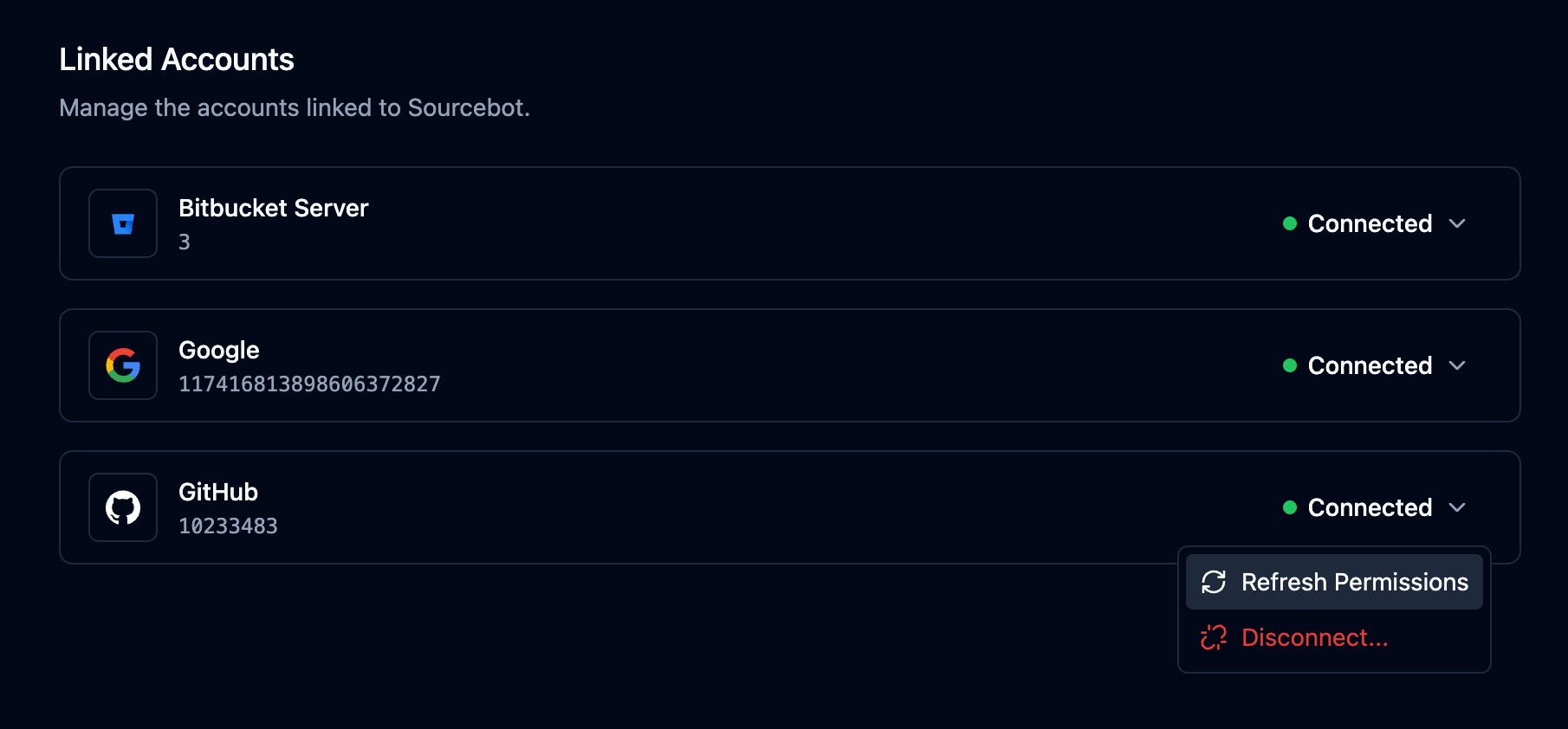
If a user’s permissions have changed and they need access updated immediately (without waiting for the next scheduled sync), they can trigger a manual refresh from the Linked Accounts page:- Navigate to Settings → Linked Accounts.
- Click the Connected button next to the relevant code host account.
- Select Refresh Permissions from the dropdown.
Overriding enforcement per connection
Each connection supports two flags that control permission enforcement for that connection’s repositories:enforcePermissions: Controls whether repository permissions are enforced for the connection. WhenPERMISSION_SYNC_ENABLEDis false, this setting has no effect. Defaults to the value ofPERMISSION_SYNC_ENABLED.enforcePermissionsForPublicRepos: Controls whether repository permissions are enforced for public repositories in the connection. When true, public repositories are only visible to users with a linked account for the connection’s code host. When false, public repositories are visible to all users. Has no effect whenenforcePermissionsis false. Defaults to false.
enforcePermissionsForPublicRepos to restrict public repositories on a Bitbucket connection so that only users who have authenticated with that host can browse them.
PERMISSION_SYNC_ENABLED, enforcePermissions, and enforcePermissionsForPublicRepos:
How it works
Permission syncing works by periodically syncing ACLs from the code host(s) to Sourcebot to build an internal mapping between Users and Repositories. This mapping is hydrated in two directions:- User driven : fetches the list of all repositories that a given user has access to.
- Repo driven : fetches the list of all users that have access to a given repository.
The sync intervals can be configured using the following settings in the config file:
FAQ
What happens if there are transient errors with the code host?
It depends on the type of error:- Authentication errors (such as
401,403,410, or a token refresh failure): Sourcebot immediately revokes the affected user’s access to repositories on that code host. - Rate limits or
5xxresponses: Sourcebot keeps the user’s existing access.
When is a visibility change of a repo (switching from public to private) reflected within Sourcebot?
The visibility state of a repository is updated when the connection belonging to that repository is synced, not when the repository’s permissions are synced. Until the next connection sync runs, Sourcebot continues to apply the repository’s previous public/private classification. The connection sync interval is configurable via theresyncConnectionIntervalMs setting in the config file and defaults to 24 hours. Lower this value if you require faster propagation of visibility changes.